
A coworking day pass gives you workspace access for one day or the daily period specified by the provider. Your package determines the desk, permitted hours, and facilities you can use. Check those details against your work schedule before visiting.
Key Takeaways
- Confirm the visit date, entry hours, and access end time when a provider describes a pass as valid for one day.
- A day pass describes duration; a hot desk describes seating in a shared work area.
- A meeting room, printer, or locker on site does not establish free access for day pass users.
- Check whether a first visit means a viewing, a trial pass, or a paid working day.
- Test the tasks you need to complete, including calls at the required local time.
Check the Working Hours Behind a One-Day Pass
The provider sets the usable hours through the package terms. Confirm the start and end time, permitted days, and any check-in deadline before planning work around the pass.
For example, a hypothetical offer permits access from 9 a.m. to 6 p.m. on your chosen date. Arriving at 3 p.m. leaves three hours of access. These are illustrative hours, not vOffice access terms.
Keep the redemption window separate from working time. A voucher you can redeem within a stated period does not explain how long you can stay after activating it.
- Check whether you choose a date when purchasing or activate the pass later.
- Ask whether late arrival changes the access end time.
- Confirm whether you can leave for lunch and return using the same pass.
- Request the rules for evenings, weekends, and public holidays if they affect your visit.
For international calls, give the provider the appointment time at the coworking location. Ask staff to confirm that both workspace access and any required call room cover that time.
Separate Pass Duration from Your Desk or Room Type
A day pass sets the access period, while the space type determines where you work. Our guide to what a coworking space is explains the shared workspace concept; your selected package sets the specific access rights.
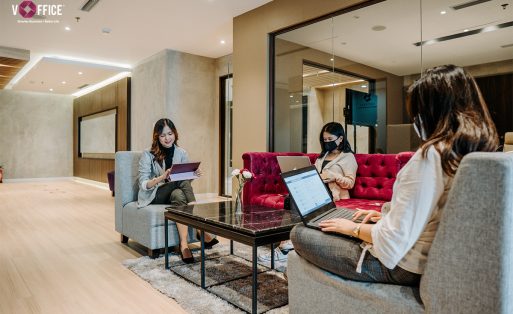
A Hot Desk in a Shared Area
A hot desk gives you the use of an available desk without a permanent desk allocation. Ask whether a reservation confirms a seat or whether the provider uses a first come, first served arrangement.
A Dedicated Desk
The provider allocates a particular desk to a dedicated desk user for the agreed period. Check whether it offers that arrangement for a single day and whether you may leave equipment there.
A Private Room
A private room gives you an enclosed area under the room booking. If you need one for team discussions, confirm the room, participant capacity, and reserved hours in the offer.
For confidential calls with overseas colleagues or local partners, check the room you may use at the appointment time. A photograph of a phone booth does not establish availability or inclusion in your pass.
Identify Included Facilities, Allowances, and Extra Charges
Ask the provider to assign a clear status to each facility in the daily package. Record it as included, subject to an allowance, charged separately, or awaiting confirmation.
| Facility | Details to Establish | Effect on Your Visit |
|---|---|---|
| Desk and Wi-Fi | Seating type, user count, power access, and connection rules. | Check that you can work with the equipment you bring. |
| Coffee, tea, and pantry | Included drinks, serving limits, and permission to bring food. | Plan meals and breaks around the local rules. |
| Meeting room or phone booth | Access rights, time allowances, availability, and extra charges. | Match the room reservation to your call schedule. |
| Printing and scanning | Included page allowance and charges for additional printing. | Request a cost estimate for documents you need to print. |
| Lockers and storage | Availability, charges, and the deadline for collecting belongings. | Confirm where you can store items while away from the desk. |
| Guests and community activities | Guest permission, registration, and event access on your visit date. | Check the rules before inviting another person. |
Leave unanswered items marked as awaiting confirmation. Plan around those facilities after the provider has explained access and charges, especially if a call or client appointment depends on them.
Notes from vOffice Consultants
We recommend checking desk access and call room access as separate requirements. For an overseas presentation, share the appointment time at the location and confirm a suitable room for that slot before choosing the day pass.
Clarify What a Trial Visit Lets You Do
Ask nearby locations whether they offer a viewing, a trial pass, or a paid day pass. Confirm which activities you can carry out during that visit.
For a viewing, ask whether you can test a desk and connection or only tour the facilities. For a trial pass, check the price, duration, new-user conditions, and permitted amenities.
If you are searching for a free coworking day pass, read the written offer and eligibility conditions. Confirm any membership credit separately; the word trial does not establish a free visit or a discount on later bookings.
Test Your First Day Against Real Work Tasks
Use your first working visit to complete tasks that reflect your needs. Choose the hours you expect to use on future visits so you can assess the location under relevant conditions.
Independent Work Without Calls
Bring a defined task, such as finishing a proposal between business appointments. Check seating, power access, and interruptions around your desk while you work.
A Working Session with Video Calls
With the location’s permission, test the connection using your usual application. Check speaking rules and permitted call areas; a headset still allows nearby people to hear your voice.
A Visit with Colleagues
Confirm how many people the booking covers and whether you can sit together. For discussions, ask which area allows conversation so your session follows the shared workspace rules.
Record your observations when choosing a coworking space that fits your business needs. Assess the working environment and the facilities included in your pass as separate parts of the decision.
Send a Short Access Checklist to the Provider
Describe your visit in one message so the provider can address the relevant package details. Include dates, users, working hours, and any call or guest requirements.
- Which desk type will I receive, and how does the provider confirm seating?
- When may I arrive, leave and return, and finish using the space?
- Which facilities are included, limited by an allowance, or charged separately?
- May I receive a guest or use a suitable call room at my required time?
- What is the total payable amount, including taxes and the extras I need?
- What are the conditions for changing dates, cancellation, and pass expiry?
Keep the answers with your package details. If the provider changes your building or room type, request confirmation of the facilities available with the replacement.
Explore a Daily Coworking Option with vOffice
We offer a Daily Plan on the coworking service page. When checked on October 19, 2026, the page listed the Daily Plan at IDR 150,000 and prices starting at IDR 150,000 per day.
IDR means Indonesian rupiah. We also list work desks, Wi-Fi, and free coffee and tea on that page. Confirm daily package inclusions, access hours, total charges, and availability at your chosen location.
For remote work in Jakarta, tell our team your preferred area and visit date. Ask about a trial if you want to test the location; the main service page we checked did not list a free trial offer.
After understanding the pass, use the guide to booking a vOffice coworking day pass for reservation steps. Check payment methods with our team before relying on an overseas card.
With your desk and call schedule defined, explore vOffice Coworking Space services. Our team can help you check access options against the work you plan to do.
Check out the various strategic locations for Coworking Spaces in Indonesia from vOffice below:
- Coworking Space Jakarta
- Coworking Space Tangerang
- Coworking Space Bali
- Coworking Space Surabaya
- Coworking Space Bekasi
- Coworking Space Medan
Unsure Whether a Day Pass Covers Your Workday?
With more than 20 years in business, we can help you check suitable workspace access.
- vOffice Indonesia. (n.d.). Coworking Space. Retrieved October 19, 2026, from
https://voffice.co.id/en/services/coworking-space