The layout of a meeting room shapes how people communicate, how decisions get made, and how long a meeting actually needs to run. Pick the wrong configuration and a 10-person strategy session can feel like a lecture, while a 50-person town hall in a boardroom setup quickly becomes chaotic.
This guide covers eight common meeting room layouts, with practical explanations of what each one is good for, how many people it fits comfortably, and what to watch out for. There is also a comparison table, guidance on hybrid-friendly layouts, and a short list of common mistakes to avoid.
8 Common Meeting Room Layouts Explained
Here are various common meeting room layouts:
1. Boardroom Style
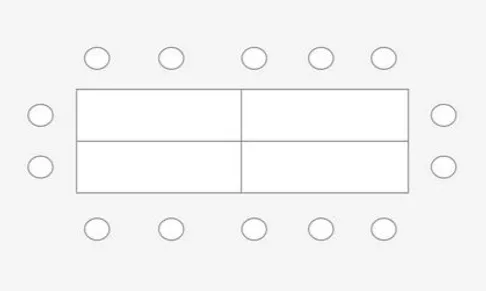
Boardroom Style places a single long table in the center of the room with chairs arranged around all sides. Every participant faces the others directly, which creates natural two-way conversation without anyone needing to raise their hand or lean across the room.
Boardroom works best for formal meetings with a limited number of attendees: board meetings, executive sessions, or business negotiations. Comfortable capacity is roughly 6 to 20 people.
Strengths: Full eye contact across the table. The formal atmosphere supports focused decision-making.
Limitations: Not ideal when a large presentation screen is the focal point, since not all seats face the same direction. Limited space for movement-based activities.
2. Hollow Square Style
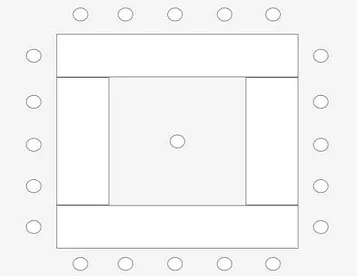
Hollow Square Style arranges tables into a square or rectangle with an open space in the middle. No single position commands the head of the table, which puts every participant on equal footing from the moment they sit down.
Hollow Square works well for cross-departmental discussions, planning forums, or any meeting where no one party should dominate the conversation. Comfortable capacity is 12 to 25 people.
Strengths: Encourages more democratic discussion. The central open space works well for physical materials, printed reports, or a flipchart.
Limitations: Corner seats can have a poor sightline to screens or whiteboards. Less efficient in smaller rooms where the hollow center wastes usable space.
3. U-Shape Style
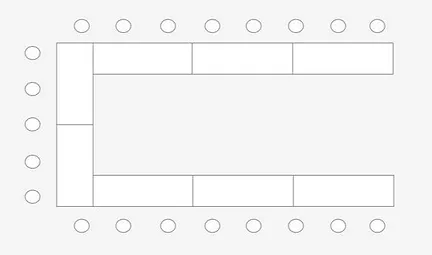
U-Shape Style arranges tables and chairs in a U formation, with the open end facing the presenter or screen. Participants get a clear view of the front of the room and can still see and interact with other participants seated across from them.
This is one of the most versatile layouts for interactive presentations, small-group training, or workshops that blend content delivery with live discussion. Comfortable capacity is 10 to 25 people. It also happens to be one of the most effective layouts for keeping people engaged, since the open U creates a natural “arena” that encourages speaking up.
Read also: How to Make Meetings More Enjoyable
Strengths: The presenter can move freely into the open space and reach all participants. Two-way interaction feels natural for everyone at the table.
Limitations: Requires a reasonably large room. Not practical when more than 25 people need to attend.
4. Classroom Style
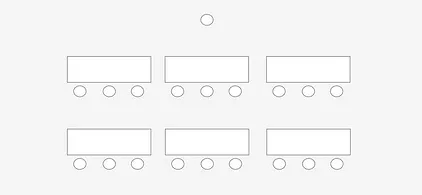
Classroom Style lines up tables and chairs in rows facing the front of the room, exactly like a school classroom. The presenter stands at the front while all participants face the same direction.
Classroom suits employee training, corporate seminars, policy briefings, or onboarding sessions where one person delivers content to a larger audience. Capacity ranges from 15 to 50 people depending on room size.
Read also: 10 Essential Meeting Room Facilities
Strengths: Fits more people into the same space than interactive layouts. Tables in front mean participants can write notes, review handouts, or use laptops.
Limitations: Very limited interaction between participants. Not suitable for brainstorming or group discussions that need active cross-table exchange.
5. Auditorium / Theater Style
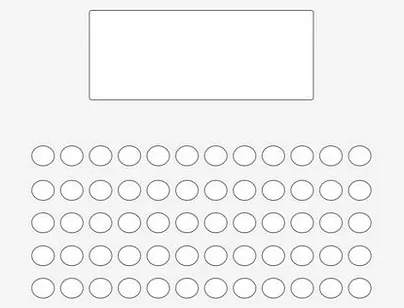
Auditorium Style, also referred to as Theater Style, places chairs in rows facing the front with no tables at all. Removing the tables allows the room to hold significantly more people than Classroom Style in the same footprint.
Auditorium is the right call for town halls, product launches, large corporate announcements, or any event where a large audience primarily listens. Capacity starts at around 30 people and scales into the hundreds for larger venues.
Strengths: Highest capacity per square meter among all common layouts. All attention stays on the stage or presenter.
Limitations: No table means no easy place to take notes. Participant-to-participant interaction is almost zero, which makes it unsuitable for any event requiring two-way dialogue.
6. Banquet Style
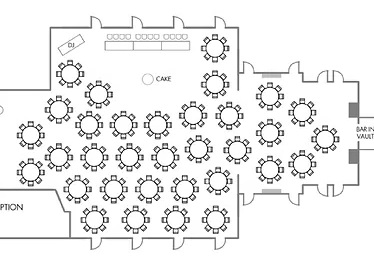
Banquet Style scatters several round tables around the room, each with chairs around them. Each table forms its own small group, able to hold independent conversations.
Banquet fits networking events, business dinners, team gatherings, or workshop sessions where groups work in parallel. Capacity typically runs between 20 and 100 people.
Strengths: Creates a relaxed, non-hierarchical atmosphere. Supports intense small-group conversation without the pressure of a formal table.
Limitations: Difficult to run a plenary session or presentation in this format. Getting all participants to focus on one speaker at the same time is a genuine challenge.
7. Cluster Style
Cluster Style places several small groups of tables around the room, typically 3 to 5 tables per cluster. Unlike Banquet Style, these tables are usually rectangular rather than round, which means one side of each cluster can be turned to face a screen when a plenary session begins.
Cluster is particularly effective for workshops, design thinking sessions, group-based training, or internal hackathons. Comfortable capacity is 10 to 30 people. The main practical advantage is that groups can work independently and then shift to whole-room mode without anyone changing seats.
Strengths: Excellent for parallel teamwork. Transitions between group mode and plenary mode are fast and require minimal rearrangement.
Limitations: Needs an active facilitator to keep all groups aligned with the overall agenda. Acoustics become important; a noisy room makes it hard for groups to concentrate independently.
8. Huddle Room Style
A Huddle Room is less a seating configuration and more a purpose-built concept: a small dedicated room designed for quick discussions between 2 and 8 people. It is smaller than a standard meeting room, equipped with a single screen, video conferencing hardware, and comfortable chairs arranged without hierarchy.
Huddle rooms are popular with agile teams, startups, and companies with flat organizational structures. Common uses include daily standups, quick cross-team syncs, or one-on-one conversations that need privacy. They also happen to be the most hybrid-friendly option, since the small number of in-person participants makes camera and microphone coverage straightforward.
Strengths: Fast and efficient for quick decisions. The compact size means a standard wide-angle camera captures everyone in the room without adjustment.
Limitations: Cannot accommodate more than a small group. If many teams need a huddle room simultaneously, availability can become a bottleneck.
Meeting Room Layout Comparison Table
A quick reference across all eight layouts.
| Layout | Capacity | Best For | Interaction Level | Hybrid-Friendly? |
|---|---|---|---|---|
| Boardroom | 6-20 | Board meetings, negotiations | High | Moderate |
| Hollow Square | 12-25 | Cross-team forums, planning | High | Moderate |
| U-Shape | 10-25 | Interactive presentations, training | High | Good |
| Classroom | 15-50 | Training, policy briefings | Low | Good |
| Auditorium / Theater | 30-500+ | Town halls, large seminars | Very Low | Limited |
| Banquet | 20-100 | Networking, team dinners | Medium | Not Ideal |
| Cluster | 10-30 | Workshops, brainstorming | Very High | Good |
| Huddle Room | 2-8 | Quick syncs, 1-on-1s | High | Excellent |
Not Sure Which Layout Fits Your Next Meeting?
vOffice’s team can help you match the right room configuration to your agenda. Available across 25+ locations in Jakarta alone.
How to Choose the Right Meeting Room Layout
Four questions will get you to the right answer most of the time.
What is the primary purpose of this meeting?
This is the single most important factor. Decision-making meetings generally work best with Boardroom or U-Shape. Training sessions call for Classroom or Cluster. Large-scale announcements need Auditorium. Networking events suit Banquet or Cluster. When in doubt, start here before thinking about capacity.
How many people are actually attending?
Count confirmed attendees, not just invites. Add a small buffer for last-minute additions and factor in presenter space. General ergonomic guidance recommends at least 1.5 square meters per person for seated meetings with tables. A room that feels slightly too large is almost always preferable to one that feels cramped.
How much participant interaction does the session need?
Meetings that depend on active participation from everyone need layouts where participants can see each other, like U-Shape, Boardroom, or Cluster. If the format is primarily one-directional delivery, Classroom or Auditorium handles that more efficiently. Many meetings underperform not because of the content, but because the layout actively discourages people from contributing.
What technology does the room need to support?
Screen placement, camera position, and audio coverage all interact with layout. For hybrid meetings especially, the layout needs to be chosen with the camera’s field of view in mind, not just the comfort of in-person attendees. For more on what facilities to look for, see 10 Essential Meeting Room Facilities.
Layout and Hybrid Meetings: What Actually Works
Hybrid meetings add a layer of complexity that purely in-person layouts do not have to consider. The core challenge is making remote participants feel like equal members of the conversation, not observers watching through a screen mounted in the corner.
U-Shape and Huddle Room consistently perform best for hybrid settings. In a U-Shape, a single wide-angle camera positioned at the open end captures all participants at once. In a Huddle Room, the small number of in-person attendees means that an omnidirectional camera on the table picks everyone up without any gaps.
Boardroom can work for hybrid with one practical condition: place the display screen showing remote participants at the same end of the table as the camera, so in-person attendees look toward the screen naturally rather than turning their backs to it during conversation.
Banquet and Auditorium are the two weakest choices for hybrid. Banquet scatters participants across separate tables, making it impossible for a single camera to capture them all. Auditorium is so heavily one-directional that remote participants have no real way to contribute. If either of these is your only option for a hybrid event, consider splitting the meeting into a broadcast component and a follow-up small-group session afterward.
Common Mistakes When Choosing a Meeting Room Layout
These are the mistakes that come up most consistently, and most of them are easy to avoid once you know to look for them.
Using Boardroom for a Large Group
Boardroom is designed for small, high-interaction groups. Squeezing 35 people around a single table creates poor sightlines, uncomfortable seating distances, and a dynamic where only the people near the center of the table end up speaking.
Choosing Classroom for Creative Sessions
Classroom seating physically encourages people to look forward and stay quiet. It suppresses spontaneous conversation, which is exactly what brainstorming and design sessions need. Cluster or U-Shape are far more effective when you want people generating ideas, not just receiving them.
Ignoring Screen Visibility
Not every seat in a Hollow Square or U-Shape has the same sightline to the presentation screen. Before confirming a layout, physically walk to the furthest and most angular seats and check whether the screen is actually readable from there. This takes five minutes and prevents a surprisingly common problem.
Forgetting Circulation Space
A room packed to its stated capacity without adequate aisle space becomes uncomfortable quickly, especially during breaks. Standard guidance suggests at least 90 cm behind each row of chairs for people to pass through without disturbing seated participants.
Defaulting to the Same Layout for Every Meeting
Organizations often stick with whatever layout the room was last set up in because changing it feels like extra effort. A weekly team standup, a client pitch, and an annual all-hands briefing have genuinely different layout requirements. If your venue uses furniture that can be repositioned in 10 to 15 minutes, it is worth doing.
Choosing the right layout matters most when the room itself supports it. That means furniture that can actually be repositioned, screens placed where everyone can see them, and enough space to accommodate your actual headcount comfortably. vOffice meeting rooms services are available across 40+ locations throughout Indonesia, including 25+ in Jakarta, with room configurations ranging from intimate 4-person setups to spaces that seat up to 50. Every room comes equipped with a projector or Smart TV, whiteboard, high-speed Wi-Fi, and air conditioning.
Check the details on the following page:
- Meeting Rooms in Jakarta
- Meeting Rooms in South Jakarta
- Rent a meeting room in Mega Kuningan
- Rent a meeting room in SCBD
- Rent a meeting room in TB Simatupang
- Rent a meeting room in Senopati
- Rent a meeting room in Cilandak
- Rent a meeting room in Pancoran
- Rent a meeting room in Menara Kuningan
- Rent a meeting room in Gatot Subroto
- Meeting Rooms in Central Jakarta
- Meeting Rooms in North Jakarta
- Meeting Rooms in East Jakarta
- Meeting Rooms in West Jakarta
- Meeting Room in Tangerang
- Meeting Room in Bekasi
- Meeting Room in Cibubur
- Meeting Room in Surabaya
Contact us now and get special offers!
Ready to Book a Meeting Room That Fits Your Agenda?
vOffice is ISO 9001 certified and trusted by 50,000+ clients across Indonesia. Professional meeting spaces, ready when you are.
Frequently Asked Questions
Which meeting room layout is the most flexible?
Cluster Style is the most flexible because groups can work independently and then pivot to a full-room session without moving seats. U-Shape is also highly flexible for sessions that blend presentation with discussion.
What layout works best for hybrid meetings?
U-Shape and Huddle Room are the two strongest choices for hybrid. U-Shape allows a single camera to capture all in-person participants. Huddle Room’s small size means even a basic omnidirectional camera covers everyone effectively. Boardroom can also work if the screen for remote participants is positioned correctly.
How much space should a meeting room have per person?
General ergonomic guidance suggests 1.5 to 2 square meters per person for interactive seated meetings with tables. For Theater or Auditorium setups without tables, 0.8 to 1 square meter per person is typically sufficient. These figures vary by building standards and local regulations.
Can you use the same room for different layouts?
Yes, provided the furniture is not fixed to the floor. Most professional meeting rooms use lightweight modular tables and chairs that can be reconfigured from Boardroom to U-Shape or Cluster in roughly 10 to 15 minutes.
Which layout is best for 30 people?
It depends on the meeting type. Classroom is the most space-efficient option for 30 people when delivery is one-directional. U-Shape or Cluster works better for interactive training or workshops. Auditorium fits 30 comfortably if the event is primarily a presentation or announcement.
What is the difference between Auditorium Style and Theater Style?
In practice, the terms are often used interchangeably. Some facility managers make a distinction where Auditorium implies a more permanent or formal setup (tiered seating, stage), while Theater refers to a flexible row arrangement of chairs without tables in a standard conference room. Both eliminate tables to maximize capacity.
Does room layout affect meeting dynamics beyond comfort?
Yes. Research on workplace design consistently shows that seating arrangement influences who speaks most and how decisions land. A traditional boardroom with a long rectangular table tends to concentrate conversational weight at the head positions. Circular or U-Shape arrangements distribute influence more evenly across the group.
References
1. International Facility Management Association (IFMA). Facility Management Practices. IFMA. Retrieved from
https://www.ifma.org
2. International Organization for Standardization. (1998). ISO 9241-5: Ergonomic requirements for office work with visual display terminals (VDTs) – Part 5: Workstation layout and postural requirements. ISO. Retrieved from
https://www.iso.org/standard/16893.html
3. Business and Institutional Furniture Manufacturers Association (BIFMA). Ergonomic Guidelines for VDT Furniture. BIFMA. Retrieved from
https://www.bifma.org
4. Steelcase. (2023). Global Report: Changing Expectations and the Future of Work. Steelcase Inc. Retrieved from
https://www.steelcase.com/research/articles/topics/post-covid-workplace/changing-expectations-future-of-work/
5. Rogelberg, S. G. (2019). The Surprising Science of Meetings: How You Can Lead Your Team to Peak Performance. Oxford University Press.