A replacement tax invoice in CoreTax is used to correct data errors in a previously issued tax invoice and must be processed through the CoreTax DJP system with the buyer’s approval. Since the full implementation of CoreTax, taxable entrepreneurs (PKP) are required to understand this process to ensure VAT Return (SPT Masa PPN) reporting remains accurate and compliant with regulations.
At vOffice, we often encounter cases where minor errors in tax invoices lead to VAT Return corrections and potential penalty risks. Therefore, understanding the replacement tax invoice mechanism is crucial for you as a PKP.
What Is a Replacement Tax Invoice?
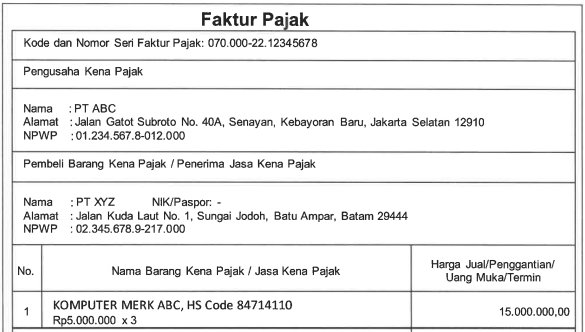
A replacement tax invoice is an invoice issued to replace a previous tax invoice that contains incorrect, incomplete, or unclear information. Corrections may only be made to transaction data, not to the buyer’s identity.
In CoreTax DJP, this process is carried out through the amend feature and requires approval from the counterparty for the invoice to be considered fiscally valid.
Read Also: How to Create a Tax Invoice in CoreTax: A Complete Guide
When a Replacement Tax Invoice Must Be Issued
You are required to issue a replacement tax invoice if there are errors in the DPP amount, VAT amount, transaction date, or details of goods and services. If left uncorrected, these errors will affect your VAT Return (SPT Masa PPN) reporting.
The Directorate General of Taxes (DJP) emphasizes data-based compliance. This means discrepancies between tax invoices and VAT Returns can be easily detected through the CoreTax system.
Steps for Sellers to Create a Replacement Tax Invoice
Below are the steps to create a replacement tax invoice in CoreTax:
- Log in to CoreTax DJP using an authorized PIC account.
- Go to the e-Tax Invoice menu and select Output Tax.
- Select the incorrect tax invoice and click the edit icon.
- Click the Amend button and update the required transaction details.
- Enter the DJP authorization code and your e-signature password.
- Save the changes and confirm the amendment.
After saving, the invoice status will change to Waiting for Amendment.
Read Also; Combined Tax Invoice: Definition, Requirements & How to Create One
Buyer Approval Process
The buyer must log in to CoreTax and access the e-Tax Invoice menu under Input Tax. Invoices with the status Waiting for Amendment must be opened and approved.
Without this approval, the replacement tax invoice is not considered final and is not fully valid for tax reporting purposes.
How to Check the Status of a Replacement Tax Invoice
Sellers can monitor the status through the Tax Invoice Status column in the Output Tax menu. The status Amended indicates that the invoice has been approved by the buyer.
Buyers can also verify the status through the Input Tax menu. Status change notifications are available via the bell icon in CoreTax.
Read Also: How to Create an Output Tax Invoice in CoreTax DJP
The Relationship Between Replacement Tax Invoices and VAT Returns (SPT Masa PPN)
A replacement tax invoice will automatically affect the data in your VAT Return (SPT Masa PPN). If the amendment is made after the return has been submitted, you may need to file a corrected VAT Return.
This is where many PKPs experience confusion. Small technical errors can lead to time-consuming administrative corrections.
Common Mistakes to Avoid
There are several common mistakes to avoid when creating a replacement tax invoice:
- Changing the buyer’s identity, which is not permitted.
- Failing to inform the buyer to promptly approve the amendment.
- Assuming the Waiting for Amendment status is already final.
- Delaying adjustments to the VAT Return (SPT Masa PPN).
Read Also: How to Create an Uploaded Tax Invoice in CoreTax DJP: A Guide from vOffice
Simplify Your Tax Compliance
Managing replacement tax invoices in CoreTax is not just about technical application usage, but also about reporting accuracy and tax compliance. We understand that not all businesses have the time and resources to manage these details.
That is why our accounting and VAT return reporting services as well as vOffice tax consulting services are the right solutions for you. We help ensure that your tax invoices, CoreTax amendments, and VAT Returns are aligned and low-risk. With the support of our professional team, you can focus on running your business without worrying about tax matters.
Contact us for a FREE consultation!
FAQ About Replacement Tax Invoices in CoreTax
Is buyer approval mandatory for a replacement tax invoice?
Yes. Without buyer approval, the invoice status will not change to Amended.
Can an amendment that has already been submitted be canceled?
No. Once an amendment has been submitted, you must wait for the approval process or make further adjustments in accordance with applicable regulations.
Does a replacement tax invoice affect the buyer’s input tax credit?
Yes. The amended invoice data will affect the buyer’s input tax and VAT credit calculation.
Does CoreTax replace the old e-Faktur system?
Yes. Since 2025, all tax invoice and replacement tax invoice processes must be conducted through the CoreTax DJP system.