Filing a corporate monthly tax return in Coretax DJP is conducted online through the official system of the Directorate General of Taxes (DJP). Companies are required to submit Monthly Tax Returns (SPT Masa) for Income Tax (PPh) or Value Added Tax (PPN) every month through the Coretax DJP platform, with some data automatically populated from the e-Faktur system and other tax documentation.
For companies, understanding this reporting process is essential to maintain monthly tax compliance and avoid administrative penalties. In this guide, we explain everything in detail—from preparation and reporting steps to common mistakes that should be avoided when submitting Monthly Tax Returns through Coretax.
Corporate Monthly Tax Return Reporting Deadline
Every company with a Corporate NPWP (Tax Identification Number) is required to submit Monthly Tax Returns according to the applicable tax type.
The reporting deadlines to note are:
- Monthly Income Tax Return (SPT Masa PPh): no later than the 20th of the following month after the tax period ends
- Monthly VAT Return (SPT Masa PPN): no later than the end of the following month after the tax period ends
If a company fails to submit its tax return on time, it may be subject to administrative penalties in the form of tax fines according to DJP regulations.
Read Also: How to Register a Corporate NPWP in Coretax: A Complete and Practical Guide
Preparation Before Filing SPT in Coretax
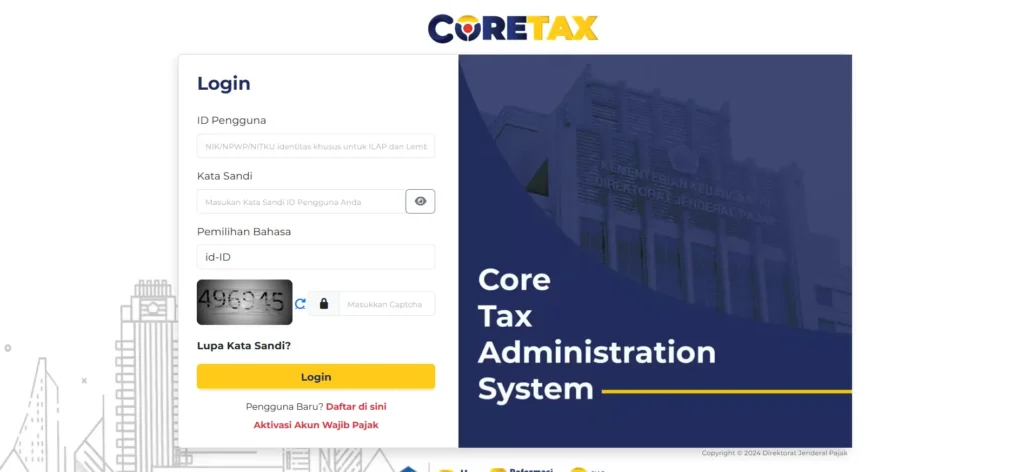
Before starting the Monthly Tax Return reporting process through Coretax, companies need to prepare several documents and system access credentials.
1. Active Coretax Account
Ensure the company already has an active Coretax account with:
- Corporate NPWP
- login password
- company access role
Read Also: How to Activate a Corporate Coretax Account: A Complete Guide from vOffice
2. Tax Electronic Certificate
An electronic certificate is required to perform a digital signature when submitting the tax return.
3. DJP Authorization Code (KODJP)
This code is used for authentication and security during the tax reporting process.
4. Supporting Tax Documents
Some important documents that need to be prepared include:
- Tax withholding slips (PPh 21, 23, 26, or Final Income Tax)
- Output Tax Invoices and Input Tax Invoices from the e-Faktur system
- Tax payment receipt or billing code
- summary of taxable goods (BKP) or taxable services (JKP) transactions
These documents will be used to verify data when preparing the tax return draft in Coretax.
Steps to File a Corporate Monthly Tax Return in Coretax
Below are the general steps companies must follow when reporting Monthly Tax Returns through Coretax.
1. Log in to the Coretax DJP Portal
Access the official Coretax DJP portal and log in using:
- Corporate NPWP
- account password
- company role access
After logging in, you will enter the system’s main dashboard.
2. Create a Tax Return Draft
Go to the menu:
Tax Return (SPT) → Create SPT Draft
Then choose the type of tax return you want to report, for example:
The selected tax return type must match the company’s tax obligations.
3. Verify and Fill in Tax Data
At this stage, the system usually displays pre-populated data from e-Faktur.
You need to perform the following actions:
- check the accuracy of tax invoices
- enter manual data if there are transactions that have not been recorded
- upload supporting tax documents
This verification process is important to ensure the tax return data reflects the actual transactions.
4. Review Tax Calculation
Once the data is completed, the system will automatically calculate the tax status, which may be:
- underpaid
- overpaid
- nil
If the result shows underpayment, the company must generate a tax billing code and make the payment before submitting the tax return.
Read Also: How to File a Nil VAT Return (SPT Masa PPN Nihil) in Coretax DJP: A Complete Guide from vOffice
5. Submit and Download the Electronic Receipt
The final step includes:
- signing electronically using the digital certificate
- clicking the Pay and Submit button
If successful, the system will issue an Electronic Receipt (BPE), which serves as official proof that the tax return has been submitted.
Common Mistakes When Filing SPT in Coretax
In practice, many companies encounter issues when using Coretax. Some of the most common mistakes include the following.
Tax Invoice Not Yet Approved
If the invoice status in e-Faktur has not yet been approved or credited, the data will not automatically appear in Coretax.
The solution is to ensure the invoice status is valid before creating the SPT draft.
Expired Electronic Certificate
An expired digital certificate may cause the submission process to fail.
Companies must renew the certificate through DJP Online services.
Incorrect Tax Return Type Selection
Selecting the wrong type of tax return can lead to incorrect tax calculations.
Make sure the selected tax type matches the company’s obligations.
Skipping the Final Review
Some companies submit the tax return without reviewing the data beforehand.
However, the review stage is crucial to ensure all documents and attachments are correct.
Read Also: Corporate Taxes in Indonesia: Types and Obligations
The Importance of Corporate Tax Compliance
Reporting corporate monthly tax returns is an essential part of a company’s tax compliance.
In addition to avoiding penalties, accurate reporting also helps companies:
- maintain financial transparency
- simplify tax audits
- improve business reputation
However, for many companies—especially those with complex transactions—the tax reporting process can be time-consuming and requires high accuracy.
Simplify Tax Reporting with vOffice Tax Consultants
If you want to ensure your company’s tax reporting is more efficient and compliant with regulations, using professional services can be the right solution.
At vOffice, we provide:
Our team helps you to:
- calculate corporate tax obligations
- prepare tax documentation
- submit Monthly Tax Returns on time through Coretax
- ensure tax compliance according to DJP regulations
With professional support from vOffice, you can focus more on running your business without worrying about complex tax administration.
Contact us for a FREE consultation!
FAQ
Is a company required to file a monthly tax return if there are no transactions?
Yes. Companies are still required to submit a nil Monthly Tax Return (SPT Masa Nihil) even if there are no transactions during the tax period.
What proof shows that the tax return has been successfully submitted in Coretax?
The official proof of tax return submission is the Electronic Receipt (BPE), which can be downloaded after the submission process is completed.
Is tax data in Coretax automatically filled in?
Some data may be automatically populated because Coretax is integrated with the e-Faktur system. However, companies still need to verify the data and add any required information or documents before submitting the tax return.
What should be done if the SPT submission fails in Coretax?
You can try clearing your browser cache, ensuring the electronic certificate is still active, and checking whether the tax invoice status is approved.
Are PPh and VAT Monthly Tax Returns reported through the same system?
Yes. Both types of Monthly Tax Returns can be submitted through Coretax DJP, but users must select the correct SPT type when creating the tax return draft.