The Annual Corporate Tax Return (SPT Tahunan Badan) in Coretax DJP is an annual tax report that must be submitted by Corporate Taxpayers to report the calculation and payment of Corporate Income Tax (PPh Badan) for one tax year. Filing the Annual Corporate Tax Return is now conducted entirely through the Coretax system of the Directorate General of Taxes (DJP), which automatically integrates reporting, payment, and fiscal validation data.
This guide on how to file an Annual Corporate Tax Return in Coretax is intended for companies, firms, foundations, and other business entities that want to report taxes accurately, on time, and in accordance with DJP regulations to avoid administrative fines and tax sanctions.
Read Also: Regulations, Deadlines, and How to File an Annual Corporate Tax Return
Preparation Before Filing the Annual Corporate Tax Return
Before starting to file your Annual Corporate Tax Return through Coretax DJP, make sure you have prepared the following:
Active Coretax Account
- Ensure your Coretax DJP account is active
- The NIK and Corporate NPWP have been matched in the DJP system
DJP Authorization Code or Electronic Certificate
- Create or update your DJP Authorization Code
- Alternatively, use a valid Electronic Certificate
- Prepare the passphrase for digital signing
Complete Financial Statements
- Balance sheet
- Income statement
- Notes to financial statements
- Equity, asset, and liability data
Supporting Tax Documents
- Archives of Periodic PPh and/or VAT returns
- Withholding and collection tax slips (Bupot)
- Proof of Article 25 Income Tax payments
- Other tax payment receipts, if any
Company Asset and Liability Data
- Cash and cash equivalents
- Trade receivables and payables
- Movable and immovable assets
- Acquisition value and fair value at year-end
Company Legal Documents
- Deed of establishment
- Latest deed of amendment
- Management and shareholder data
Profile Updates in Coretax
- Company address
- Active phone number and email
- Business activity data
- Company bank account
Read Also: Corporate Tax in Indonesia: Types and Obligations
Steps to Create an Annual Corporate Tax Return Draft
After all preparations are complete, follow these steps to create an Annual Corporate Tax Return draft in Coretax:
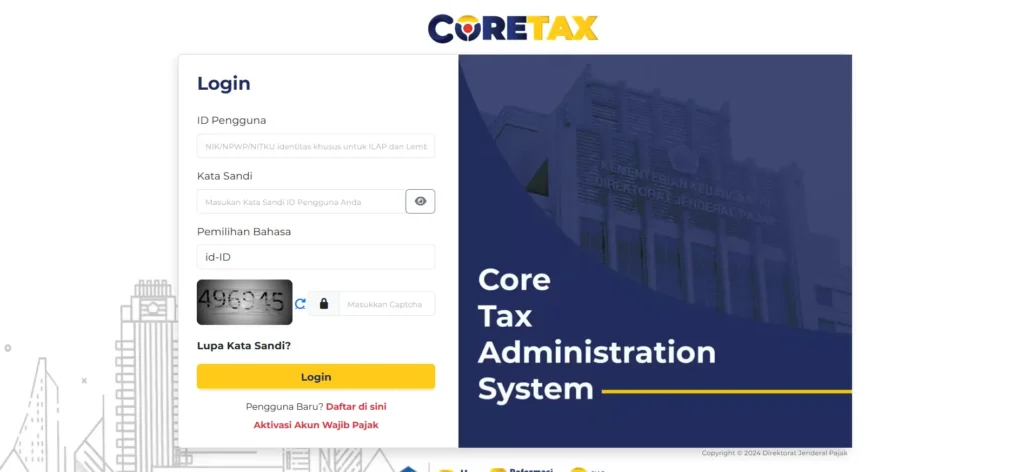
Log in to Coretax DJP
- Access https://coretaxdjp.pajak.go.id
- Enter the NPWP or 16-digit NIK and your DJP Online password
Access the SPT Menu
- Select the Tax Return (SPT) menu
- Click the Create SPT Draft submenu
Select the Tax Type
- Select Corporate Income Tax (PPh Badan)
- If using a foreign currency, select Corporate Income Tax in foreign currency
Select the SPT Type
- Select Annual SPT
- Ensure it is not a Periodic SPT or Partial SPT
Determine the Tax Period and Tax Year
- Select the January–December period
- Specify the tax year to be reported
Determine the Reporting Type
- Normal for first-time reporting
- Amended if correcting a previously filed SPT
Create the SPT Draft
- Click the Create SPT Draft button
- The system will prepare the main form and required attachments
Completing the Main SPT Form
The Main Form is the core of the filing process. At this stage, you answer questions related to business type, bookkeeping methods, and certain transactions.
Your answers will determine which attachments must be completed. Ensure the company identity data matches the deed and official documents.
Completing SPT Attachments in Coretax
SPT attachments in Coretax are far more detailed. Reconciliation of financial statements is the main focus, including positive and negative fiscal adjustments.
In addition, Coretax requires completion of capital lists, debts, affiliated receivables, gross turnover, as well as asset and liability lists with acquisition values and year-end fair values. Accuracy at this stage is critical to your final SPT results.
Upload Documents and Verification
After all forms are completed, upload supporting documents in PDF format. Conduct a final review, as Coretax will notify you if any data is inconsistent.
We recommend saving the draft before final submission.
Payment and Submission of the SPT
If there is underpaid income tax, the system will issue a billing code. The tax must be paid before the SPT is submitted.
After payment, proceed with electronic signing and submit the SPT. An Electronic Receipt will be issued as official proof of filing.
Deadlines and Risks of Late Filing
The Annual Corporate Tax Return must be filed no later than March 31 of the following year. Late filing is subject to a fine of IDR 1,000,000, as well as potential interest penalties if the tax has not been paid.
With the integrated Coretax system, even minor errors can be easily detected.
Why Many Business Entities Choose Professional Assistance
In practice, many business owners, consultants, and freelancers operating as legal entities struggle to allocate sufficient time and resources for detailed SPT filing. This is where professional services become relevant.
As vOffice, we provide accounting and tax reporting services designed to help you understand, complete, and submit your Annual Corporate Tax Return in Coretax correctly. We ensure your financial data aligns with fiscal regulations and that your reporting is safe from administrative risks.
If you want your Annual Corporate Tax Return filing to be simpler, more controlled, and fully compliant, vOffice tax services are the logical next step.
Contact us for a FREE consultation!
FAQ About Annual Corporate Tax Returns in Coretax
Are all business entities required to use Coretax?
Yes. All Corporate Taxpayers are required to file their Annual Tax Returns through Coretax DJP.
Can an SPT be amended after submission?
Yes. You can submit an amended SPT through Coretax by selecting the amendment type when creating a new draft.
Must tax payment be made before filing the SPT?
Yes. Any outstanding tax payable must be settled before the Annual SPT is submitted.
What happens if the SPT is not electronically signed?
The SPT is considered not submitted and may be subject to administrative sanctions.