You can now file your Individual Income Tax Annual Return (PPh Orang Pribadi) online via mobile phone through Coretax DJP using a fully digital, secure, and legally valid process. Filing for the 2025 tax year can be completed until 31 March 2026, simply by using a mobile browser—no need to visit the tax office (KPP). Coretax is designed to be responsive on mobile devices and supports electronic signatures.
As tax consultants, we at vOffice frequently assist families and individuals who want to stay tax-compliant in a practical way—including those who wish to file their tax return via mobile phone, even when managing family NPWP arrangements or consolidated tax obligations.
What Is Coretax DJP and Can It Be Accessed via Mobile Phone?
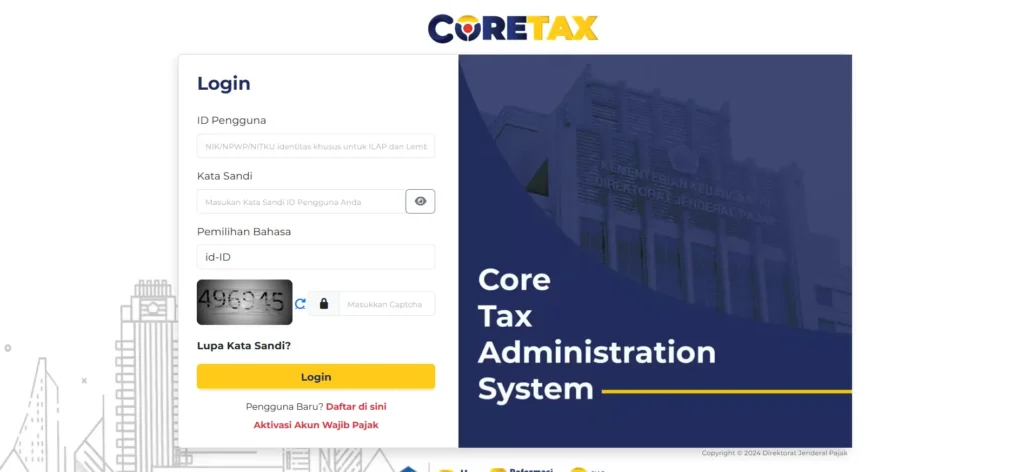
Coretax DJP is the Directorate General of Taxes’ integrated system for tax administration and reporting. This platform replaces the old manual and legacy e-Filing processes with a centralized workflow, covering Annual Tax Returns, electronic certificates, and electronic filing receipts.
Advantages of using mobile phone access:
- Accessible via Chrome or Safari browsers.
- Mobile-friendly interface.
- Digital signatures using electronic certificates.
- Electronic Filing Receipt (BPE) is automatically saved.
Read Also: How to File Individual Annual Tax Return on Coretax: A Complete Guide from vOffice
Mandatory Preparation Before Filing Your Tax Return via Mobile Phone
Before starting, make sure you have prepared the following to ensure a smooth process.
Active Coretax Account
Activation is completed on the Coretax platform using your NPWP, registered email address, and mobile phone number recorded with the DGT. After verification, you will be asked to change your password and create a passphrase.
Electronic Certificate
This certificate is mandatory for digital signatures. Apply through the “My Portal” menu until the status shows VALID.
Tax Documents
Prepare your PPh 21 withholding slips (Form 1721-A1 or A2), family data, and a list of assets and liabilities as of 31 December.
Steps to File Your Annual Tax Return Online via Mobile Phone
Follow the steps below in sequence to avoid errors.
1. Log In to Coretax DJP via Mobile Browser
Log in to your account and select the Tax Return (SPT) menu.
2. Create an Annual Tax Return Draft
Select:
- Tax type: Individual Income Tax
- Return type: Annual Tax Return
- Tax year: 2025
- Return model: Normal
3. Complete the Tax Return Form
Coretax provides approximately 13 sections, ranging from identity details to declarations. Complete them according to your documents:
- Income from employer.
- Taxes already withheld.
- Family and dependent status.
- Assets and liabilities.
If you only have one employer, select Yes for the relevant question to simplify the form completion.
4. Digital Signature and Submission
Use your electronic certificate and passphrase to sign the tax return, then submit it. Save the Electronic Filing Receipt (BPE) for your records.
Read Also: How to Download the Latest e-SPT Tax File
Important Tips to Avoid Errors When Filing via Mobile Phone

- Use a stable internet connection.
- Avoid peak server hours, such as midday.
- Ensure all data matches your withholding slips.
- Clear your browser cache if pages load slowly.
- For zero (nil) returns, you must still create a draft and submit it.
Read Also: How to Check Submitted Tax Returns on Coretax DJP: A Complete Guide from vOffice
Solutions to Common Issues When Filing Tax Returns on Coretax
- Login failure: check that your NPWP, email, and mobile number match DGT records. Use the “forgot password” feature if necessary.
- Electronic certificate failure: ensure your NIK and NPWP data have been successfully validated.
- Submission or server errors: save the draft, try again at a different time, and use the latest browser version.
Most issues can be resolved without visiting the tax office, as long as you follow the correct troubleshooting steps.
When Should You Consider Professional Assistance?
If you:
- Are unsure how to report assets and income.
- Manage family taxes or consolidated tax obligations.
- Do not want to risk incorrect reporting or penalties.
Then professional assistance is a practical choice.
vOffice Helps You File Your Tax Return Hassle-Free
As a provider of accounting and tax return filing services and online tax consulting, we at vOffice help you file your Annual Tax Return accurately, efficiently, and in compliance with the latest Coretax regulations. Our services are ideal for individuals, families, and busy professionals who want to focus on their core activities without administrative tax stress.
Tax filing does not have to be complicated. With the right assistance, you can stay compliant with peace of mind.
Contact us for a FREE consultation!
FAQ: How to File Your Annual Tax Return Online via Mobile Phone
Is filing a tax return via mobile phone legally valid?
Yes. Filing through Coretax DJP is legally valid as long as you receive the Electronic Filing Receipt (BPE).
Is an electronic certificate mandatory?
Yes. An electronic certificate is required for the digital signature when submitting your tax return.
What if my tax return is nil (zero)?
It must still be filed. You are required to create a tax return draft and submit it.
Can I file my tax return before the deadline?
Highly recommended. Filing early reduces the risk of server errors and late-filing penalties.
Can one mobile phone be used for multiple accounts?
Yes, as long as you log in separately and maintain the security of each account’s data.