Activating a Coretax DJP account is a mandatory step for Individual Taxpayers and Corporate Taxpayers to submit the 2025 Annual Tax Return (SPT) and other tax obligations electronically before the March 2026 deadline. The Coretax system, managed by the Directorate General of Taxes (DJP), replaces and integrates various legacy services. Without a valid activated account, you risk being unable to legally sign and submit your SPT.
We often encounter taxpayers who already have an NPWP but are not aware that Coretax requires a separate activation process, including the creation of a passphrase and an authorization code as an electronic signature. In this article, we explain the process comprehensively and practically so you can complete it without issues.
What Is Coretax DJP and Why Activation Is Mandatory
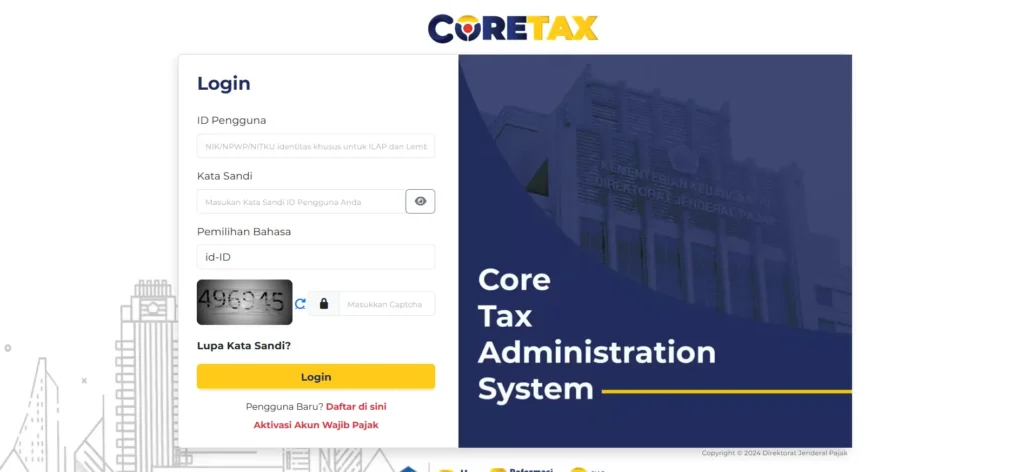
Coretax DJP is an integrated tax administration system used for SPT filing, tax data management, and digital authorization. Coretax relies on a 16-digit NPWP, which for Individual Taxpayers has been integrated with the National ID Number (NIK).
Activating a Coretax account ensures that the Taxpayer’s identity is validated, tax data is synchronized, and all filings have legal force because they are electronically signed using an authorization code.
Initial Requirements for Coretax Activation
Before you begin, make sure the following requirements are ready:
- An active DJP Online account
- A 16-digit NPWP or an integrated NIK
- An active and registered email address and mobile phone number
- Identity data that matches the DJP database
If there are any changes to your data, it is advisable to update them first through the local Tax Office (KPP) or Kring Pajak to avoid activation rejection.
Also Read: How to File a Corporate Annual Tax Return in Coretax: A Guide from vOffice
Steps to Activate a Coretax DJP Account
The activation process is generally similar for all taxpayers, with differences mainly in data completeness.
- Access the official Coretax DJP website.
- Select the Taxpayer Account Activation menu and indicate that you are already registered.
- Enter your 16-digit NPWP or NIK, then proceed with verification.
- Enter your email address and mobile phone number, then continue identity verification.
- Check your registered email for an official message from DJP containing a temporary password.
- Log in again, change your password, and create a passphrase.
This passphrase is confidential and will be used each time you digitally sign tax documents.
Creating an Authorization Code as an Electronic Signature
After your account is active, you must create an authorization code. This code functions as an electronic signature for SPTs and other tax documents.
The process is done through the My Portal menu, then Authorization Code Request or Electronic Certificate. Make sure the certificate status is valid and keep the activation proof documents for your records.
Also Read: How to File an Individual Annual Tax Return in Coretax: A Complete Guide from vOffice
Differences Between Coretax Activation for Individual and Corporate Taxpayers
In general, the activation flow is the same, but the level of complexity differs.
Individual Taxpayers only need simple identity verification using their NIK, NPWP, and a self-photo. The process is relatively fast.
Corporate Taxpayers require additional data such as company establishment documents, the responsible person’s identity, Business Classification (KBLI), and business address. Legal validation is the main focus, so the process may take longer.
Common Mistakes to Avoid
Common issues include inactive email addresses or phone numbers, unsynchronized NPWP data, and forgetting to store the passphrase securely. These mistakes can hinder SPT filing and increase the risk of administrative sanctions.
Simplify Coretax Activation and SPT Filing with vOffice
Managing Coretax activation, authorization codes, and SPT filing often requires time and careful attention. This is where vOffice can help. Through our accounting and SPT filing services and vOffice tax consulting services, we ensure that all your tax processes are accurate, compliant, and completed on time.
For those who want to focus on their business or professional activities without the hassle of tax administration, vOffice’s tax services are the right solution to streamline your overall SPT filing process.
Contact us for a FREE consultation!
FAQ About Coretax Activation
Is Coretax activation mandatory for all taxpayers?
Yes, both Individual and Corporate Taxpayers are required to activate Coretax for electronic tax filing.
Does the NIK automatically become the NPWP in Coretax?
For Individual Taxpayers, an integrated NIK functions as a 16-digit NPWP.
Yes, it can be changed through the Coretax account settings by following the required re-verification procedure.
What happens if I have not activated Coretax but the SPT deadline has passed?
You risk being unable to file on time and may be subject to administrative penalties.